
The wrong spam call blocker can be worse than the spam. A phone that never rings sounds peaceful until the missed call is a doctor, school office, recruiter, bank fraud team, delivery driver, client, or family member using a number you do not recognize.
That is the buyer problem here. Hiya is my best default spam call blocker app because it has a free Basic path, visible lower App Store Premium pricing, cross-platform fit, and official evidence for call screening, AI voice/deepfake detection, and fraud warnings. Phone by Google is the best free Android baseline after Google's June Android Drop made fake-call detection a current category signal. Truecaller is the caller-ID network pick if you accept more privacy and pricing friction. RoboKiller is the aggressive specialist when the spam is so bad that stronger interception is worth the tradeoff.
This is not a hands-on call-blocking test. I did not install the apps, start subscriptions, place live calls, send spoofed calls, measure caller-ID accuracy, or test voicemail routing. I checked official product pages, Google Play/App Store listings, pricing sections, rendered screenshots, current search competitors, GDT operator data, and concrete Reddit product-limit threads. Treat the ranking as an evidence-led buying shortcut, not a lab benchmark.
The Reddit check was deliberately narrow: r/technology and r/UniversalProfile surfaced product-limit questions around spoofing and fake-call verification, not representative sentiment.
If the bigger problem is that your number is already scattered across people-search sites, pair this with our data broker removal services guide and the focused DeleteMe vs Incogni vs Optery comparison. If scam calls are part of broader account or credit risk, read our identity theft protection guide, password manager picks, and passkey storage guide before stacking more subscriptions.
-
#1 HiyaBest default: free Basic, lower visible Premium price, AI voice/fraud features, and balanced real-call risk
-
#2 Phone by GoogleBest free Android baseline: native spam protection plus fresh fake-call detection on supported devices
-
#3 TruecallerBest caller-ID network: strong database and Assistant story, with privacy and price friction
-
#4 RoboKillerBest aggressive specialist: worth a look when spam calls and texts are overwhelming
If I were cleaning up a normal phone today, I would start with the least invasive option that can still help. On Android, that means trying Phone by Google if your device supports it. For a cross-platform app, I would compare Hiya first. I would use Truecaller when caller ID coverage matters more than minimal data exposure, and RoboKiller only when the spam volume is bad enough to justify an aggressive filter.
The trap: silence is not the same as safety
Most spam-call rankings reward aggression. The app blocks the most calls, has the biggest database, says the loudest number, or promises the most dramatic answer-bot experience. That is useful until the buyer depends on unknown callers.
That is the part most roundups skip.
The practical question is narrower: how much protection can you add before the blocker becomes a second gatekeeper? A good setup warns, labels, screens, and blocks obvious junk. A bad setup turns every unfamiliar number into a risk you discover too late.
That is why I ranked real-call safety beside spam reduction. A freelancer, parent, caregiver, job seeker, clinic patient, or local-business owner should not use the same default as someone who never answers unknown numbers. The right blocker depends on whether missing a real call costs more than hearing another scam ring.
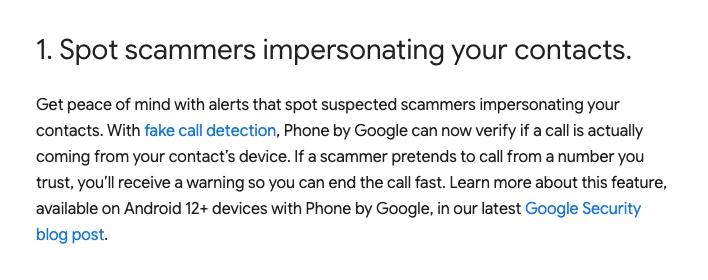
The newest reason to revisit the category is Google's June Android Drop. Google announced fake call detection for Phone by Google on Android 12+ devices, framing it around scammers impersonating trusted contacts. That does not make every paid app obsolete, but it changes the buying order: native protection deserves a real first pass before another subscription.
How I ranked these spam call blocker apps
I weighted five criteria: spam reduction, real-call safety, platform fit, price clarity, and privacy friction. Raw blocking claims helped, but they did not decide the order alone. The best app for a retired person who never answers unknown calls can be the wrong app for a realtor, recruiter, parent, doctor-patient household, or contractor.
I also separated three jobs that competitors often mash together. Caller ID tells you who may be calling. Call screening asks unknown callers to identify themselves. Aggressive blocking or forwarding tries to keep the call from reaching you at all. Those are different risk profiles.
The evidence boundary matters more than the feature count. A product page can document a screening feature or state a blocking claim; it cannot verify the false-positive rate on your number, carrier, country, or contact pattern. That is why I treat detection percentages as vendor claims and rank the consequence of a missed legitimate call separately.
Price clarity mattered because this category is full of freemium language, trials, in-app purchases, and platform-specific subscriptions. Hiya's U.S. App Store listing showed Premium at $3.99/month, $9.99/quarter, and $24.99/year, plus Lookup Plan Monthly at $2.99. Truecaller's official Premium page showed Premium at USD 74.99/year, Family at USD 99.99/year, and Gold at USD 249.00/year, while its App Store listing also showed Premium Monthly at $9.99 and Premium Yearly at $74.99. RoboKiller's App Store page said a subscription is required after trial and listed several membership IAP values including $7.99, $79.99, and $89.99, so I do not treat one value as a universal plan price.
Messy pricing is a buyer risk too.
| Feature | Hiya | Phone by Google | Truecaller | RoboKiller |
|---|---|---|---|---|
| Best fit | Balanced first third-party app for iPhone/Android | Android users who should exhaust native protection first | Caller-ID network buyers who want Assistant/Premium features | Spam-heavy phones where aggressive blocking is worth the setup |
| Starting price checked | Basic free; Premium $3.99/mo or $24.99/yr on U.S. App Store | Free app; no paid plan listed in Google Play page | Premium USD 74.99/yr; Family USD 99.99/yr; Gold USD 249.00/yr | Free download; subscription required after trial; IAP values vary |
| Protection signal | Call screener, AI voice/deepfake detection, fraud call detection, advanced blocking | Spam warnings, Call Screen caveats, and June Android Drop fake-call detection | Advanced spam blocking, Assistant, AI Call Scanner, caller ID network | Vendor claims 99% spam call/text blocking and Answer Bot-style interception |
| Real-call risk | Moderate; screening can help avoid pure silence | Lower default risk because it starts native and less subscription-heavy | Moderate; useful ID context but still depends on permissions and settings | Higher; aggressive routing can be the wrong default for real-call-dependent users |
| Platform caveat | AI voice, fraud, and call screener features have U.S./Canada, language, device, OS, carrier, and plan caveats | Android 12+ and Phone by Google ecosystem; Call Screen availability varies by country/language/device | Feature availability varies; iOS caller ID has OS/settings requirements | Subscription, forwarding, voicemail, and app-store billing details require extra care |
| Main tradeoff | Free path is useful, but the strongest protection is Premium | Not a universal iPhone or cross-platform solution | Stronger network story comes with heavier privacy-label friction | High spam-fighting posture, but more friction before I would recommend it broadly |
| Action | Compare Hiya | Try Android baseline | Compare Truecaller | Compare RoboKiller |
1. Hiya: best default spam call blocker app for most people
Hiya wins because it is the easiest recommendation to explain without pretending the category is cleaner than it is. The official Hiya page says Basic protection is always free. Premium adds the heavier features: Hiya Call Screener, AI voice and deepfake detection, fraud call detection, premium lookups, advanced blocking, and visual voicemail.
That free-to-paid split matters. A buyer should not need to start with the most aggressive or most expensive path before they know whether a call blocker fits their life. Hiya Basic gives a lower-risk first move; Premium is there if AI voice scams, call screening, and fraud warnings are the actual pain.
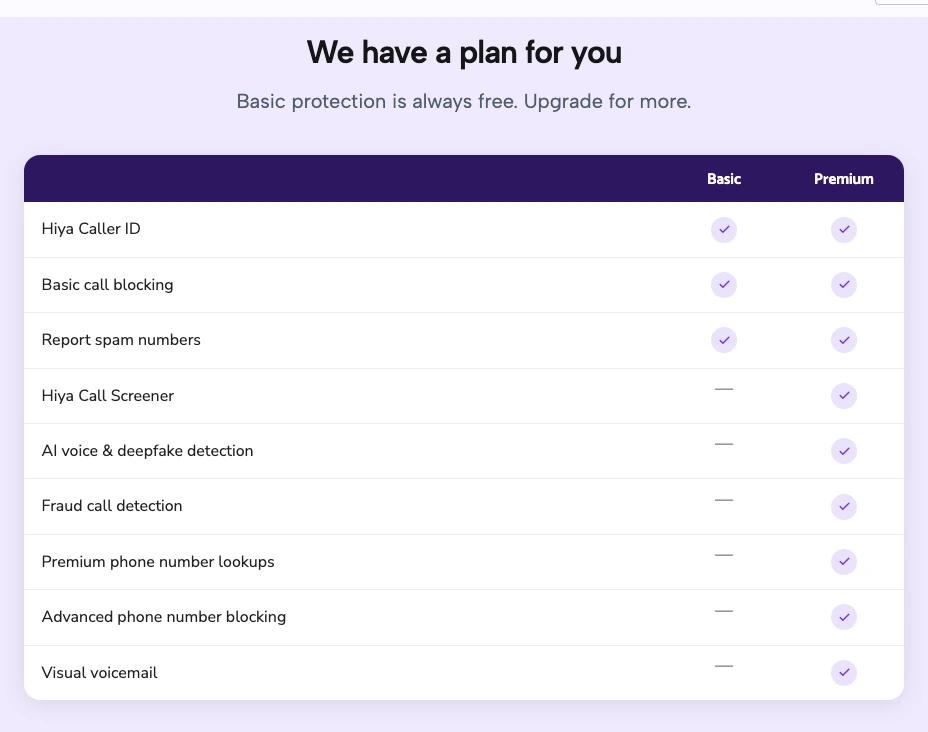
The App Store listing also gives enough friction to keep the recommendation honest. Hiya says Call Screener, AI Voice Detection, and Fraud Detection are currently U.S. and Canada only, with language and feature-availability caveats. The app is not a magic shield. No detection system catches every scam, and a buyer should still keep bank, school, family, and medical contacts in a safe allow-list mindset.
The reason Hiya still comes first is balance. It has a current AI-scam protection angle, a visible free path, Premium pricing that is easier to swallow than Truecaller's main Premium page, and less aggressive default posture than RoboKiller. It is the pick I would try before paying for a more invasive call-routing workflow.
Hiya has the cleanest balanced story: free Basic protection, visible lower App Store Premium pricing, and current AI voice/fraud features without starting from the most aggressive blocker.
Skip Hiya if you need a measured detection benchmark, live carrier behavior proof, or you are outside the regions where its newest fraud and AI voice features apply.
Hiya ranks first because it balances spam reduction, real-call caution, current scam-protection evidence, and price clarity better than the alternatives.
- Free Basic path before paying for Premium
- Premium adds call screening, AI voice/deepfake detection, fraud detection, advanced blocking, and visual voicemail
- Lower visible App Store Premium price than Truecaller Premium
- Better default balance than starting with the most aggressive interception model
- Strongest AI voice and fraud features have region, language, device, OS, carrier, and plan caveats
- No live blocking or false-positive test was performed here
- Premium is still needed for the most interesting protection features
- Caller-ID databases can still miss or mislabel numbers
2. Phone by Google: best free Android baseline
Phone by Google belongs in this ranking because Google's June Android Drop made native call protection current again. Google framed fake-call detection around suspected scammers impersonating real contacts, with availability on Android 12+ devices using Phone by Google. The Google Play page also describes caller ID, spam warnings, and Call Screen caveats.
The buying advice is simple: if you are on Android and your device supports Phone by Google features, try the native path before paying a third-party subscription. A native app does not automatically mean lower risk, but it avoids one obvious problem: adding another app with another subscription, another privacy policy, and another call-handling layer before you know whether built-in protection is enough.
The limitation is reach. This is not an iPhone solution, and even on Android, feature availability depends on device, OS, country, language, and phone-app support. Google's fake-call detection also depends on the Phone by Google ecosystem rather than magically verifying every number on the public telephone network.
Google's June Android Drop makes Phone by Google the freshest native option to try before adding a paid call-blocker app.
Skip it if you use iPhone, your Android device does not support the relevant Phone by Google features, or you need a cross-platform household setup.
Phone by Google ranks second because free native protection is the right first move for many Android users, but it cannot be the universal winner.
- Free Android baseline before adding another paid app
- Fresh June Android Drop fake-call detection signal
- Spam warnings and Call Screen caveats are documented on Google Play
- Lower subscription and third-party-app friction than paid blockers
- Not useful for iPhone buyers
- Feature availability varies by Android version, device, country, language, and settings
- Fake-call verification is not a universal public-network guarantee
- No live call test was performed here
3. Truecaller: best caller ID network, with privacy friction
Truecaller is the app I would pick for someone who specifically wants a big caller-ID network and Premium Assistant-style features. Its official Premium page lists advanced spam blocking, auto-block spam, Truecaller Assistant, AI Call Scanner, caller ID, and Family/Gold tiers. The value proposition is not subtle: identify more callers, add more context, and pay for a deeper layer.
The price and privacy friction keep it out of the top spot. The official Premium page showed Premium at USD 74.99/year, Family at USD 99.99/year, and Gold at USD 249.00/year. The App Store listing showed Premium Monthly at $9.99 and Premium Yearly at $74.99. That is not outrageous if the network is the feature you need, but it is a different buying tier than Hiya's $3.99/month or $24.99/year App Store Premium listing.
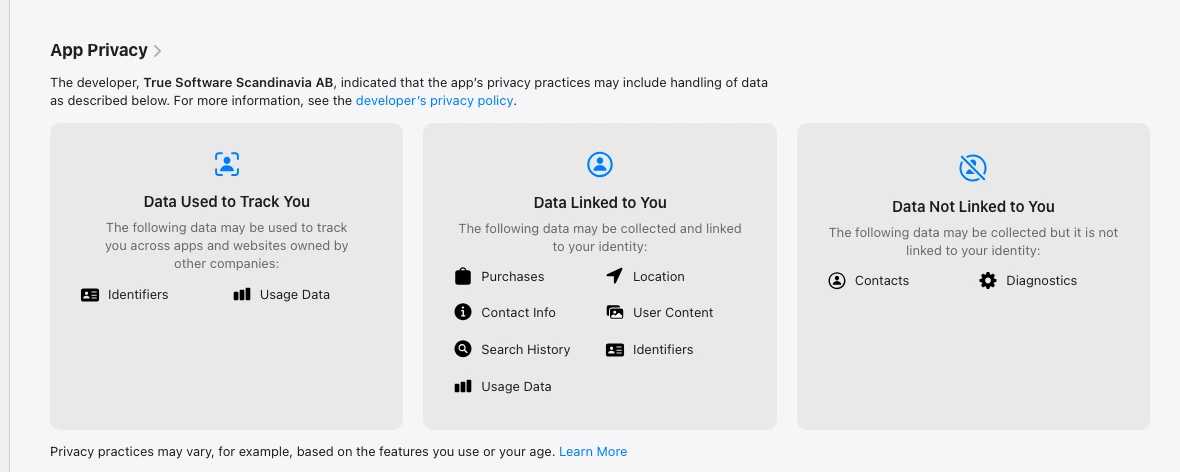
The privacy label is the other reason to slow down. The App Store page listed identifiers and usage data under data used to track, plus multiple data categories linked to the user. That does not automatically make Truecaller unsafe, but it does mean privacy-sensitive buyers should read the policy instead of treating caller ID as a free privacy win.
Truecaller makes sense when the caller-ID database is the thing you value most. It makes less sense if your main goal is the lightest possible call protection with the fewest data and subscription decisions.
Truecaller has the strongest caller-ID network story in this group, but it asks the buyer to accept more pricing and privacy-label friction.
Skip Truecaller if your priority is minimal data exposure, a lower paid price, or a simple free/native first move.
Truecaller scores high on caller ID and spam features, but privacy and price friction make it a more specific pick.
- Strong caller-ID network story with Premium Assistant and AI Call Scanner features
- Official Premium, Family, and Gold pricing is visible on the public page
- Good fit for buyers who want caller context more than silent blocking
- Family plan can make sense for households that want one paid caller-ID setup
- Premium page pricing is higher than Hiya App Store Premium pricing checked here
- App Store privacy label deserves a careful read before relying on the app
- Feature availability varies by platform, OS, region, and settings
- No live caller-ID or Assistant test was performed here
4. RoboKiller: best aggressive blocker for spam-heavy phones
RoboKiller is the specialist, not the default. The official homepage claims it can block 99% of spam calls and texts, and the App Store page positions it around stopping robocalls and texts with in-app purchases. That is exactly the kind of app I would consider if a phone is being hammered every day and normal filtering is not enough.
The same strength is also the caution. Aggressive blocking, answer-bot workflows, subscriptions, forwarding, and voicemail behavior are precisely the pieces I would want to test on my own phone before trusting it with real-world calls. The tradeoff is not subtle: higher spam aggression increases the risk of missed real calls or messy voicemail behavior. RoboKiller may be the right choice for a spam-heavy line. It is a bigger leap for someone who cannot miss unknown callers.
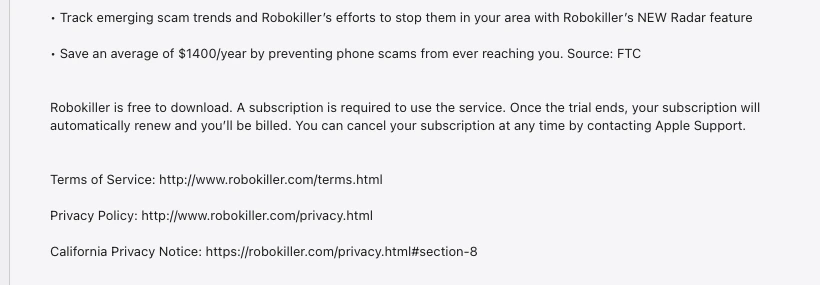
The App Store subscription language is also why I keep the pricing caveat explicit. The page says RoboKiller is free to download, but that a subscription is required to use the service after the trial. It also showed multiple membership IAP values, including $7.99, $79.99, and $89.99, rather than one clean universal price. Buyers should confirm the exact platform and checkout terms before relying on any single number.
RoboKiller is the right shortlist entry when the buyer wants aggressive spam blocking more than a quiet, low-friction default setup.
Skip RoboKiller as a first move if missed real calls, voicemail behavior, or subscription ambiguity would create a bigger problem than spam.
RoboKiller's blocking posture is strong, but the real-call and subscription tradeoffs keep it behind the quieter defaults.
- Strong aggressive-blocking posture for spam-heavy phones
- Official homepage makes a clear 99% spam call/text blocking claim
- App Store positioning is directly aligned with robocalls and spam texts
- Worth considering when lighter native or freemium tools are not enough
- Not the first app I would use on a phone that must receive unknown legitimate calls
- Subscription is required after trial according to the App Store page
- Multiple IAP values make the public price less clean than Hiya or Truecaller
- No live forwarding, voicemail, cancellation, or false-positive test was performed here
Also considered: carrier tools, Apple settings, and YouMail
Carrier spam tools and Apple's built-in call controls are still worth checking before paying. If your carrier includes spam labeling or a free call-filter tier, try it. If your iPhone workflow can tolerate Apple's Silence Unknown Callers, that may solve the interruption problem without a third-party caller-ID database. The cost is obvious: unknown legitimate calls can also go quiet.
I looked at YouMail too, but it did not make the main ranked group during this pass because the public pricing evidence was less clean from the pages I could verify. That is not a product verdict. It is a publication decision: if I cannot document the buyer price and feature boundary cleanly enough, I would rather leave it out than fake certainty.
Aura also appears in our parental control apps comparison because its family bundle includes spam call protection alongside identity protection, VPN, antivirus, password manager, and data broker removal. That can be useful if you already want a full family security bundle. It is not the focused spam-call app I would buy first if the only job is cleaning up incoming calls.
How to choose without missing real calls
Start with your missed-call tolerance, not the app store ranking. If you can ignore unknown numbers with no real cost, an aggressive blocker is easier to justify. If unknown calls can be urgent, professional, medical, school-related, or customer-related, choose a softer setup first.
Then write down which job you need. Native Android protection points to Phone by Google. Balanced third-party filtering points to Hiya. Caller-ID network and Assistant features point to Truecaller. High-volume spam and text abuse points to RoboKiller. Buying the wrong job is how people end up with three overlapping call tools and no idea which one swallowed a real call.
Finally, test in your own risk window. Turn on one layer at a time. Add important contacts. Watch voicemail behavior. Keep the app's logs visible for the first week. If you run a business or handle family logistics, do not activate the most aggressive setting the day before a critical appointment, delivery, interview, or client call.
Start boring.
The boring setup is usually the best one: native protection where possible, one third-party app if native is not enough, and clear rules for who must always get through. A spam blocker should make your phone less hostile, not make you afraid of your own missed-call list.
Hiya is the best default because it balances free Basic protection, lower visible Premium pricing, AI voice and fraud feature evidence, and a more cautious real-call profile than the most aggressive blocker.
Compare HiyaSpam call blocker app FAQ
Ready to check Hiya?
Use the verified route if the trade-offs still fit. If not, jump back to the summary and compare the alternatives.
Security and privacy editor focused on evidence-led buying guides. Reads official documentation, audit notes, privacy policies, recovery limits, and support pages before turning security claims into practical recommendations.
Sarah starts by locating the evidence boundary, then ranks security and privacy tools by audit and policy scope, recovery design, trust boundaries, residual risk, and what a cautious buyer can verify.
Related Articles
Venice AI vs Proton Lumo vs Duck.ai: Which Private AI Chat Fits?
Private AI chat decision guide
Venice AI, Proton Lumo, and Duck.ai compared by privacy architecture, saved-history protection, provider exposure, plan limits, model access, and price.
Malwarebytes vs Bitdefender vs Norton
Paid antivirus decision guide
Malwarebytes, Bitdefender, Norton, and Microsoft Defender compared by paid antivirus value, real-time protection, renewal risk, bundle scope, and lab evidence.