
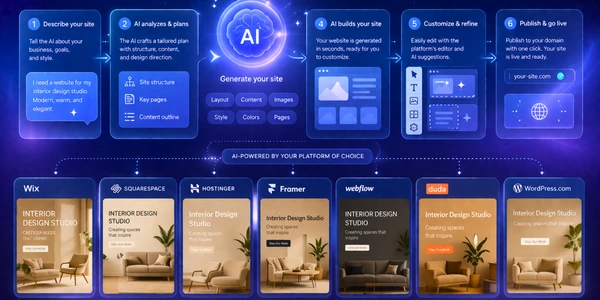
The buyer decision is not whether an AI website builder can make a draft. The risk is accepting its bill before you know whether the editor fits.
Wix remains my default pick for most small-business sites. Its official comparison now lists Core at $29 under a yearly commitment, and that package combines the AI-first launch path with a mainstream visual editor. Squarespace is the better design-led choice. Framer is the sharper option for people who already think in pages, components, and interaction design.
The cheap-looking alternative is Hostinger. Its Premium offer currently shows $2.99, but the official page also shows four years paid upfront for $143.52 and a later charge of $10.99. That is not a reason to reject it. It is a reason to compare the whole contract instead of the number in the largest font.
This is an evidence-led comparison. I checked the seven official checkout tables, public AI-builder pages, visible payment qualifiers, current package names, starter or trial paths, and three fresh evidence screenshots on August 23, 2026. I did not create accounts, publish sites, measure generation time, test support, run performance benchmarks, process payments, or export a live project.
If you only need a one-page validation test, read our Mixo review first. For a fast validation page versus a longer-lived small-business site, the Mixo vs Durable comparison is the cleaner fork. Content teams should also check our AI SEO tools guide before treating the site builder as the whole publishing stack.
-
#1 WixBest overall for a small-business site that needs an AI draft and a conventional visual editor
-
#2 SquarespaceBest design-led path with a guided Blueprint AI workflow and clear three-plan pricing
-
#3 FramerBest for design-heavy marketing sites when interaction control matters more than beginner simplicity
Start with Wix for the balanced default, Squarespace for the design-led route, or Framer when interaction design is the main job.
How I ranked the seven builders
The shared rubric gives 30% to AI Launch Fit, 25% to how clearly the published figures are explained, 15% to Trial Path, 20% to Small-Site Value, and 10% to exposure after the introductory offer. AI Launch Fit asks whether the public workflow gets a reader from a business description to an editable draft. The second axis rewards an official page that shows the real commitment instead of only a low recurring equivalent.
Trial Path matters because a generated draft is not proof that the editor will fit your work. Small-Site Value rewards the package a portfolio, consultancy, restaurant, or local service business could actually keep. The final axis accounts for later increases, long prepayment, collaborator charges, and package complexity.
The countercase against Wix is strong: a buyer who cares more about restrained design defaults than maximum editing freedom may get to a better-looking first public version with Squarespace. A designer who wants a more specialized marketing-site canvas may prefer Framer. Wix wins because it is the most balanced default, not because it is best at every axis.
The contract matters more than the headline
These seven checkout tables express recurring charges in four different ways. Wix shows a 30-day equivalent for a one-year subscription paid in full. Squarespace lets you compare one-year and 30-day views. Hostinger divides a four-year purchase into a recurring equivalent. WordPress.com shows the yearly figure and the later charge on the same card. Those numbers are all useful, but they are not interchangeable.
Then come the extras outside the base card. Framer adds $20 for an additional editor and $10 for a content editor in each 30-day cycle. Squarespace changes its transaction deduction by package. Duda includes a limited number of published projects and lists additional sites separately. Webflow separates ordinary site packages from a Team platform offer that starts at $2,500 for each 30-day cycle with a one-year commitment. A reader comparing only the cheapest card would miss the part that actually changes the budget.
The practical test is to write down the site you will maintain, not the demo you want to generate. How many collaborators need edit access? Will you sell products, memberships, or digital content? Do you need one published site or a client portfolio? Can you tolerate a four-year prepayment? Which paid package would you still choose after the starter access or trial ends?
Answer those questions before opening the AI prompt box. The prompt can reduce blank-page friction. It cannot make a long commitment shorter, remove a transaction deduction, include another editor, or turn an agency platform into a simpler small-business tool.
AI website builder comparison
| Feature | Wix | Squarespace | Framer | Webflow | Hostinger | Duda | WordPress.com |
|---|---|---|---|---|---|---|---|
| Official starting path | Free plan | Basic $12/mo annual | Free plan | Starter free | Premium $2.99/mo promo | Basic $19/mo annual | Free plan |
| Useful paid reference | Core $29/mo | Core $17/mo annual | Basic $10/mo | Basic $15/mo | $143.52 for 48 months | Agency $52/mo annual | Business $25/mo annual |
| Billing condition | Yearly subscriptions paid in full | Annual or monthly toggle | Yearly view shown | Yearly view shown | Long term paid upfront | Annual plans charged upfront | 12-month billing with renewals shown |
| Free or trial path | Free plan | 14-day trial | Free plan | Starter free | 14-day builder trial; 30-day refund | 14-day trial; 30-day refund | Free plan |
| Best job | General small-business site | Design-led service or portfolio site | Design-heavy marketing site | Structured professional web production | Low upfront-equivalent budget | Agency and client-site operations | Plugin-led hosted WordPress site |
| Main cost risk | Higher tiers rise to $159/mo | Store and digital-content fees vary by plan | $20/mo additional editors | Team platform plan starts at $2,500/mo | Renews at $10.99/mo | Additional published sites cost extra | AI is one part of a broader hosting stack |
| Action | Check Wix | Check Squarespace | Check Framer | Check Webflow | Check Hostinger | Check Duda | Check WordPress.com |
1. Wix: best AI website builder for most small businesses
Wix's official US view now shows five options: $0, Light at $19, Core at $29, Business at $39, and Business Elite at $159. The qualifier under the cards matters: those figures are for yearly subscriptions paid in full, taxes are excluded, and the final charge appears before payment.
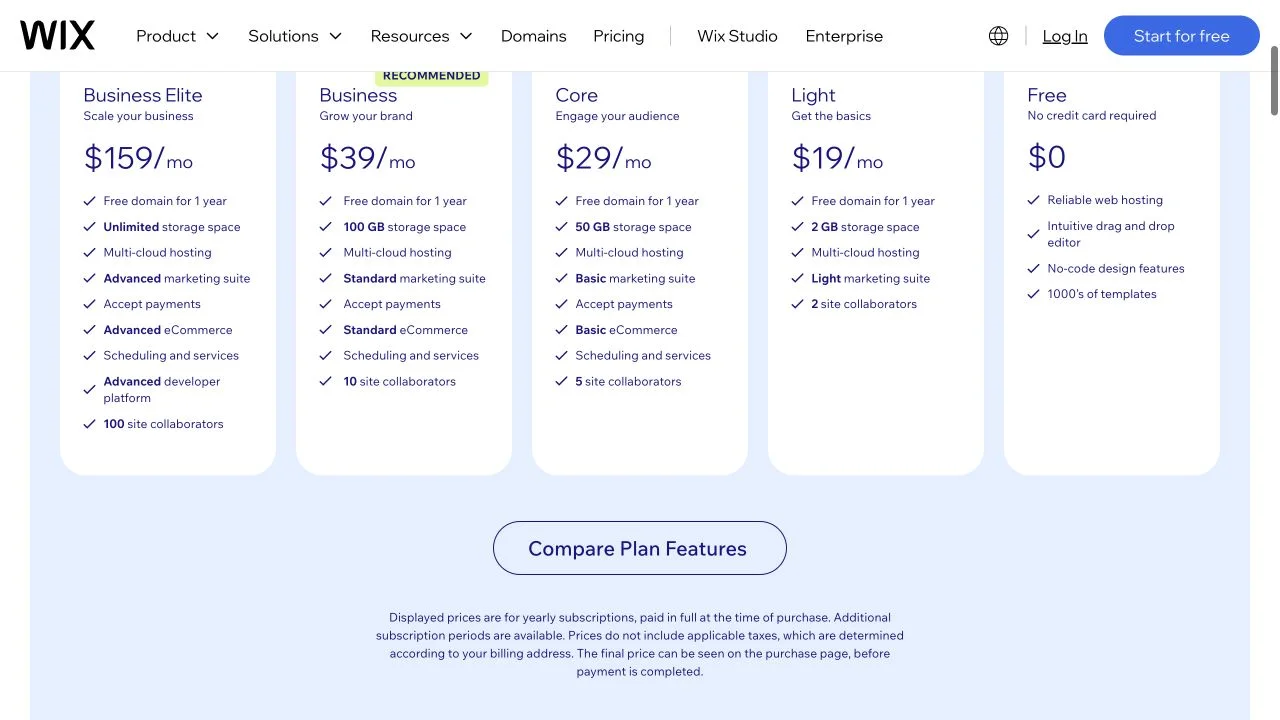
Core is the useful reference package because the official card adds a custom domain for one year, 50 GB of storage, basic ecommerce, payments, scheduling, and five collaborators. Light is cheaper, but the public card is much narrower. Starter access is the sensible place to learn whether Wix's editor makes sense before you accept a one-year commitment.
Choose Wix if you want the balanced small-business default. It wins because its package ladder is understandable and the AI builder is attached to a broad mainstream website product. Skip it if restrained design defaults matter more than editor breadth; the tradeoff is the distance between starter access and the $29 Core package most businesses will evaluate.
The official plan ladder connects a free test path to a Core tier that includes the main business-site features.
Skip Wix if restrained design defaults matter more than editor breadth or if you only need a temporary landing page.
Wix ranks first because its AI launch path, free starting point, and legible Core plan make it the safest balanced default.
- Official free plan gives buyers a no-payment editor test path
- Core card clearly lists payments, basic ecommerce, scheduling, and five collaborators
- Yearly billing qualifier and tax caveat are visible on the pricing page
- Plan ladder covers a simple site through high-end business use
- Core, not Light, is the more realistic reference for a small business that needs payments or ecommerce
- Yearly displayed rates require payment in full rather than true month-to-month spending
- Business Elite reaches $159 per month on the official yearly view
- No authenticated editor, support, checkout, or site-export workflow was tested here
2. Squarespace: best design-led AI setup
Squarespace's current lineup is simpler than the old four-option structure. On the official USD yearly view, Basic is $12, Core is $17, and Advanced is $25. The 30-day view shows $19, $27, and $36. There is a 14-day trial instead of a permanent starter edition.
Blueprint AI also deserves a more accurate description than "template picker." Squarespace's official workflow asks for brand information, then generates images, copy, design suggestions, and a personalized website framework. That is a guided system, but it is still a genuine AI-assisted draft path.

Choose Squarespace if you want design guardrails more than maximum editor freedom. The tradeoff is store economics: the official comparison shows a 2% online-store fee and a 7% digital-content or membership fee on Basic. Core drops the store fee to 0% but keeps 5% for digital content. Advanced shows 0% for both. Basic fits a service or portfolio site better than a growing store.
Blueprint AI combines brand questions with generated images, copy, design suggestions, and a personalized framework.
Skip Squarespace if you need a permanent free site or want to avoid plan-specific commerce fees.
Squarespace nearly wins on price clarity and design-led setup, but the lack of a free plan and commerce-fee boundaries narrow the default fit.
- Three current plan names are easier to compare than the previous four-plan ladder
- Official annual and monthly USD prices are both visible
- Blueprint AI documents a clear brand-input-to-draft workflow
- Fourteen-day trial gives enough access to judge the public editor fit before paying
- No permanent free plan after the trial
- Basic charges transaction fees for online stores and digital content or memberships
- The guided workflow may feel more constrained than a blank-canvas design tool
- No authenticated store, template-switching, export, or cancellation workflow was tested here
3. Framer: best for design-heavy marketing sites
Framer's yearly page now centers on a starter edition, Basic at $10, Pro at $30, and Enterprise custom. The older Mini, Launch, and Scale ladder is gone from the current public view. Basic lists 30 pages, two CMS collections, 50 GB of bandwidth, and a custom domain. Pro lists 150 pages, ten CMS collections, 100 GB of bandwidth, staging, redirects, and branching with previews.
The team expense is the catch. Framer shows additional editors at $20 and content editors at $10 for each 30-day cycle. A design studio should calculate collaborators before treating $30 as the whole Pro bill.
Framer's current Basic and Pro plans pair simple starting prices with explicit page, CMS, bandwidth, and collaboration limits.
Skip Framer if you want the simplest small-business editor or expect the base plan to include every collaborator.
Framer ranks third because the free path and $10 Basic plan are strong, while editor-seat costs and a design-centric model reduce its default fit.
- Free plan provides a real public starting path before a custom domain is needed
- Current yearly ladder is simple: Free, Basic, Pro, and Enterprise
- Basic and Pro publish page, CMS collection, and bandwidth limits
- Pro explicitly includes staging and branching with previews
- Additional editors cost $20 per month on the public page
- Basic is capped at 30 pages and two CMS collections
- Design-centric workflow is a poor fit for buyers who want more guardrails
- No live collaboration, localization, add-on, or publishing workflow was tested here
4. Webflow: best when the site is becoming a production system
Webflow's current yearly site view lists Starter without payment, Basic at $15, and Premium at $25. Basic is for simple sites without a CMS; Premium adds Webflow CMS and starts with 50 GB of bandwidth. The Starter edition publishes on a webflow.io domain and includes two static pages.
The public checkout page also separates platform packages. Team starts at $2,500 for each 30-day cycle with a one-year contract, while Enterprise is custom. The reason to choose Webflow is a structured web-team workflow, not a simple site subscription. Its main risk is overbuying platform complexity when the actual job is a five-page local-business site.
Webflow clearly separates simple site plans from a Team platform plan with a very different price and governance scope.
Skip Webflow if you only need a simple personal or local-business site and do not need professional production controls.
Webflow ranks fourth because the free path and explicit site plans are credible, but platform complexity lowers small-site value.
- Starter plan gives buyers a free product-learning path
- Basic and Premium site-plan jobs are stated directly
- Premium includes CMS and configurable bandwidth on the public table
- Team and Enterprise are separated from ordinary site plans
- Free Starter is limited to two static pages
- The Team platform plan begins at $2,500 per month with an annual contract
- Site plans, platform plans, and add-ons require more buying discipline than simpler builders
- No authenticated designer, CMS, AI, export, or collaboration workflow was tested here
5. Hostinger: best headline number, biggest contract caveat
Hostinger's current official US page shows Premium at $2.99, Unlimited at $3.99, and Cloud Startup at $7.99. The smaller lines supply the decision: Premium is $143.52 for four years and later moves to $10.99; Unlimited is $191.52 for four years and later moves to $16.99; Cloud Startup is $383.52 for four years and later moves to $25.99.
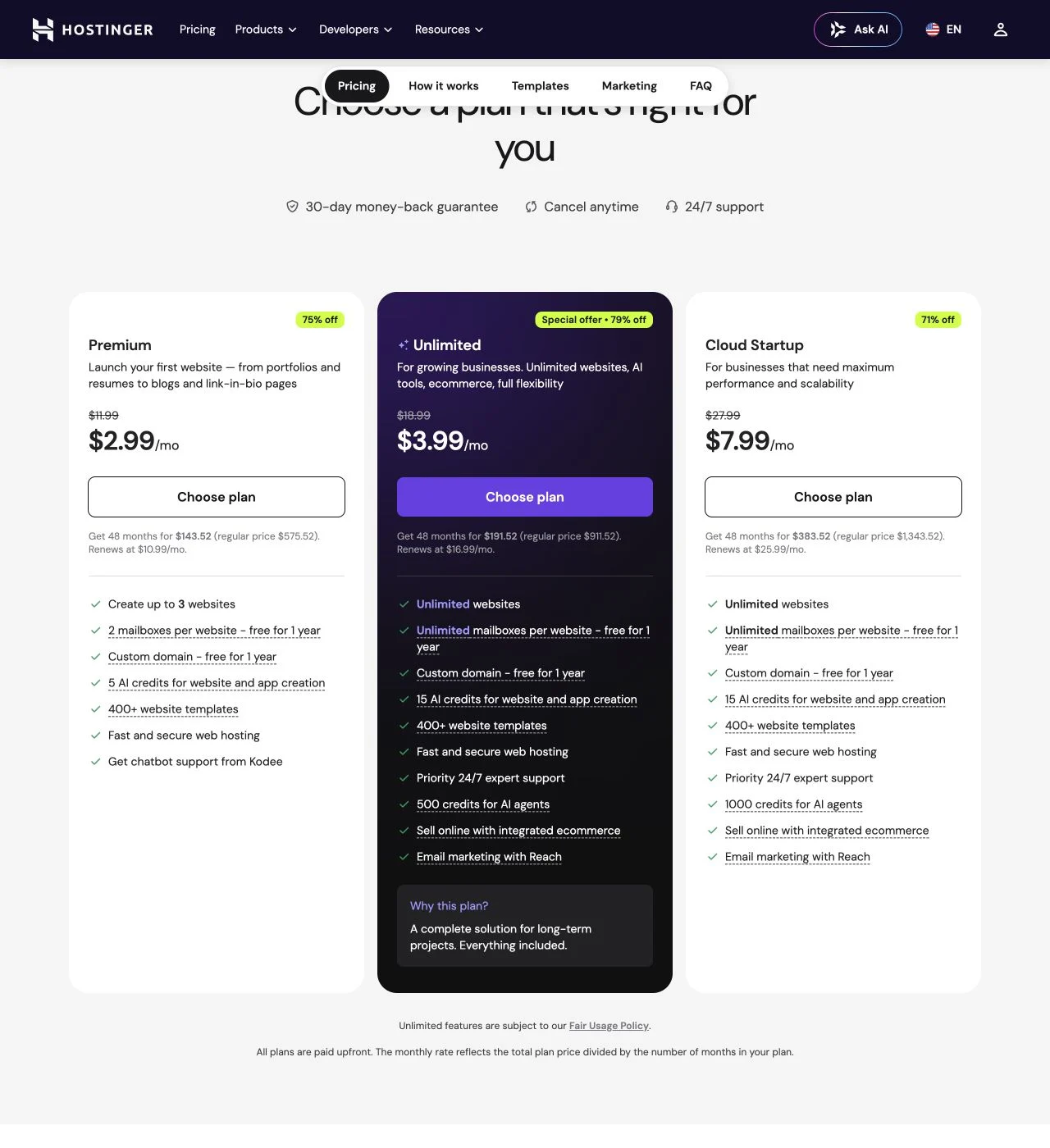
The trial story is better than the old article reported. The official page currently offers a 14-day website-builder trial and shows a 30-day money-back guarantee above the offer cards. That reduces the product-fit risk, but it does not remove the long-term payment decision.
Hostinger is still a valid budget choice when you know you will keep the site for years and can pay upfront. It ranks below Framer and Webflow because the low recurring equivalent is inseparable from a four-year purchase and a much higher later charge.
The official page exposes the full 48-month total and renewal price, which changes how the $2.99 headline should be evaluated.
Skip Hostinger if you do not want a 48-month prepaid commitment or cannot tolerate a higher renewal rate.
Hostinger earns solid AI and small-site value scores, but the long prepayment and renewal jump are the largest cost risk in this comparison.
- Current plan cards show the promotional rate, full 48-month amount, and renewal price together
- Fourteen-day website-builder trial is available on the official page
- Thirty-day money-back guarantee is visible above the plan cards
- Premium and Unlimited give budget buyers two clearly positioned entry paths
- $2.99 per month requires $143.52 paid for 48 months
- Premium renews at $10.99 per month on the current official view
- Unlimited replaces the older Business plan name, so old comparisons are easy to misread
- No authenticated editor, refund request, renewal checkout, or cancellation flow was tested here
6. Duda: best for agencies, not the default individual buyer
Duda's official yearly view lists Basic at $19, Team at $29, Agency at $52, and White Label at $149. Yearly packages are charged upfront. The page also offers a 14-day trial with no payment card and a 30-day money-back guarantee.
Choose Duda if you run repeat client projects; skip it if you are the one-site buyer. Its agency bias is visible in the comparison table: Agency and White Label include four published projects, while Basic and Team include one. Duda also lists client workspaces, team access, white-label features, separate costs for extra published projects, and 150 AI units every 30 days across the standard paid packages.
Duda's pricing table makes the agency operating model explicit through included projects, client workspaces, seats, and white-label tiers.
Skip Duda if you are building one personal or small-business site and do not need client management.
Duda scores well on price clarity and trial access but ranks sixth because its strongest value appears in agency workflows, not the default one-site job.
- Annual prices and the upfront-billing qualifier are clearly visible
- Fourteen-day trial requires no credit card on the public page
- Agency and White Label include four published projects
- Standard paid plans list 150 monthly AI credits
- Basic and Team include only one published project
- Additional published projects carry separate monthly or yearly prices
- Best capabilities are aimed at agencies and client delivery rather than one-site buyers
- No client handoff, white-label, support, or extra-site billing workflow was tested here
7. WordPress.com: best when the plugin ecosystem is the real reason
WordPress.com now belongs in the AI-builder conversation more than the old article allowed. Its official subscription page says paid editions include a guided website builder that can create and launch a site through chat. Business and Commerce also list a built-in AI assistant for content, design, and site management.
On the official USD yearly view, Personal is $4 and later moves to $5, Premium is $8 and later moves to $9, Business is $25 and later moves to $28, and Commerce is $45 and later moves to $50. Starter access remains available. Business is the practical reference when advanced hosting, AI assistance, and a broader production stack matter.
Use WordPress.com if you are buying the wider plugin and publishing system. It ranks last here because AI site creation is one feature inside a much broader hosted platform. Skip it when the job is simply a clean five-page business site and the extra system weight has no payoff.
The current official plans pair a guided chat-based website builder with the wider WordPress hosting and plugin stack.
Skip WordPress.com if AI-first site generation is the whole purchase and you do not need the broader WordPress system.
WordPress.com is flexible and price-transparent, but its AI builder is part of a larger platform that is heavier than the default small-site job.
- Free plan gives buyers a permanent no-payment starting path
- Official yearly view shows both promotional and renewal prices in USD
- Guided website builder is listed across paid plans
- Business and Commerce explicitly include a built-in AI assistant
- AI is one feature inside a broader hosting and publishing platform
- Business at $25 per month is the more relevant reference for the advanced stack
- The cheapest plan is not automatically the simplest AI-first purchase
- No plugin, migration, AI-assistant, support, export, or renewal workflow was tested here
How to choose an AI website builder
If you are building a local-business site, portfolio, or service page and want the lowest-risk default, choose Wix. Start without payment, then judge whether the $29 Core package earns the upgrade.
If visual restraint matters more than maximum editor freedom, choose Squarespace. Basic is attractive for a non-commerce site. Move to Core or Advanced only after you understand the transaction-deduction boundary.
If you already think like a designer, choose Framer. If your website work is becoming a governed production system with CMS, teams, and broader platform needs, compare Webflow carefully. Those are not beginner upgrades; they are different operating models.
Choose Hostinger only after multiplying the full term, not the headline monthly equivalent. Choose Duda when client delivery, seats, and multiple published projects are the job. Choose WordPress.com when hosted WordPress and its broader ecosystem are the reason you are shopping.
The wrong-reader warning is simple: do not choose the builder with the most impressive generated homepage. Choose the editor, payment term, and migration burden you can still accept half a year after the demo.
Frequently Asked Questions
Final verdict
Wix is the best overall AI website builder for most small businesses because it gives you starter access, a clear mainstream upgrade path, and a Core package that covers the capabilities many businesses actually need. The official $29 figure assumes a one-year commitment; it is not a promise that everyone should upgrade immediately.
Squarespace is the closest alternative. Its current three-option structure is cleaner, Blueprint AI is more capable than a basic template picker, and the $12 Basic offer is attractive for a design-led site without serious commerce. Framer is the stronger countercase for designers who value a specialized marketing-site workflow.
Hostinger is the one to read twice. The product has a legitimate 14-day trial and a low promotional equivalent, but the four-year total and later charge matter more than the billboard number. Webflow and Duda are good products aimed at more operationally complex teams. WordPress.com makes sense when the WordPress system is the point.
My recommendation is not to pay on the strength of the first AI draft. The wrong-buyer risk is committing to an editor or billing term that looked harmless during setup. Use starter access or a trial, rebuild one real page, inspect the paid package you would keep, and calculate the total at the next term. The draft gets you started. The contract decides whether the builder remains a good tool.
Ready to check Wix?
Use the verified route if the trade-offs still fit. If not, jump back to the summary and compare the alternatives.
Crypto and productivity editor focused on cost, custody risk, setup friction, exports, fees, and workflow drag. Prioritizes verifiable numbers and clear skip criteria over hype.
Lucas starts with total operating cost, then ranks tools by setup and recurring friction, custody or export, reversibility, and whether the decision still makes sense when the exit path is included.
Related Articles

Hey Noah vs Lindy vs Fyxer: Best AI Executive Assistant
AI executive assistants compared by action authority, reversibility, workflow fit, cost predictability, context reach, and trust readiness
Compare Hey Noah, Lindy, and Fyxer by approvals, email sending, scheduling, calls, integrations, security, and current entry prices.

Paste vs Maccy vs Raycast: Which Mac Clipboard Manager Fits?
Mac clipboard managers compared by local history, Apple-device sync, privacy posture, launcher fit, setup burden, and subscription value
Paste, Maccy, and Raycast compared by clipboard history, Apple-device sync, local storage, privacy posture, pricing, and workflow fit.