
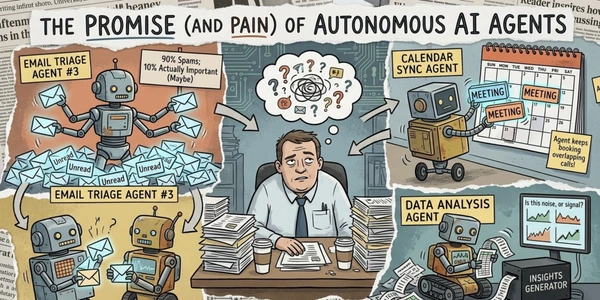
Here's something the AI industry doesn't want you to hear right now: a RAND study found that 80-90% of AI agent projects fail in production. Gartner predicts 40% of agentic AI initiatives will be scrapped by 2027. And Gary Marcus, who's been tracking AI claims for years, called agents "endlessly hyped but far from reliable."
So why am I writing a roundup recommending them?
Because buried under the marketing noise, a few tools actually deliver. Not the "autonomous AI workforce that replaces your entire team" nonsense you'll read on vendor blogs (every top Google result for this keyword is literally a company ranking itself #1). But real, useful agents that handle specific repetitive tasks well enough to save you hours per week. Email triage. Meeting follow-ups. Lead qualification. Data extraction. Narrow stuff. Boring stuff. The stuff that actually matters.
I dug into six platforms, verified all pricing on official sites this week, cross-referenced Reddit complaints and developer forums, and calculated what you'd actually spend running agents in the real world. The gap between what these tools promise and what they deliver is... significant. But so are the savings when you find the right fit.
-
#1 Lindy AIEasiest setup — describe what you want, connect your tools, done
-
#2 CrewAIBest for developers — open-source core, multi-agent orchestration, 50 free executions/mo
-
#3 Relevance AIBest for teams — AI workforce with 2,000+ integrations and a real free tier
The "agent washing" problem nobody talks about
Before we get into individual tools, you need to understand what you're actually buying. Gartner estimates only about 130 out of thousands of companies claiming to sell "agentic AI" actually offer real agent technology. The rest? Chatbots with extra API calls, rebranded RPA scripts, or rule-based automation wearing a trench coat.
A real AI agent does three things: it perceives context (reads your email, understands a conversation), it reasons about what to do next, and it takes autonomous action (sends a reply, books a meeting, updates a record). If the tool you're evaluating needs you to define every single step manually, it's an automation platform, not an agent. Nothing wrong with that, but you shouldn't pay agent prices for it.
The tools below all offer some level of genuine agency. How well they deliver on it varies wildly.
Lindy AI — the one that's actually easy to set up
Most agent builders assume you're a developer. Lindy assumes you're someone who just wants their email handled and their meetings prepped without learning Python. And for that specific audience, it works surprisingly well.
If that personal-operations job is the entire purchase, compare Lindy with Hey Noah and Fyxer as AI executive assistants; the narrower guide separates draft-only, approval-gated, and more proactive external action.
The setup goes like this: you describe what you want the agent to do (in plain English), connect your tools (Gmail, Slack, calendar, CRM), and Lindy figures out the workflow. No flowcharts, no node editors, no YAML configs. There are hundreds of pre-built templates for common tasks: email triage, meeting scheduling, follow-up drafts, even medical scribe and podcast notetaking. The iMessage integration means you can trigger agents from your phone, which is a nice touch.
But the credit system is where things get ugly. Lindy uses a consumption model where each task costs $0.01 to $0.10+ depending on which LLM it calls under the hood. That sounds cheap until your agent runs a complex loop and burns through credits in ways you didn't anticipate. Multiple Reddit threads mention surprise bills, and one particularly frustrated user wrote: "Please stay away from Lindy.ai: it is a complete nightmare" — specifically citing the credit burn on multi-step workflows.
The free trial is 7 days. That's it. Previously they offered 400 credits/month on a free tier, but premium actions were locked behind the paywall, making it useless for anything beyond a demo. If you want to seriously evaluate Lindy, you're committing $49.99 before you know if it works for your use case.
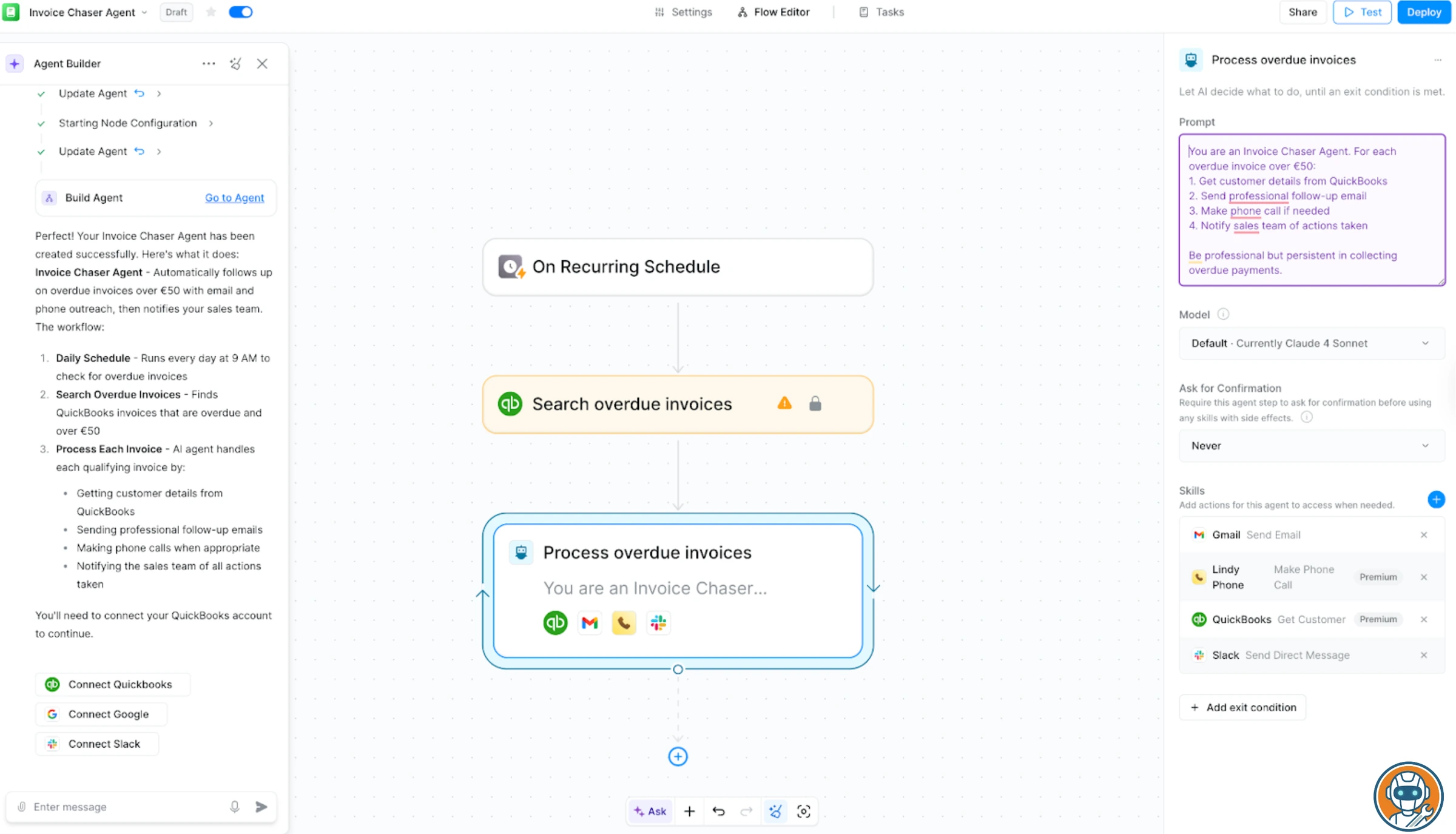
Genuinely zero-code setup where you describe what you want in plain English and connect your tools.
Anyone who needs transparent, predictable pricing on agent runs.
- Genuinely zero-code setup. Describe what you want, connect tools, and it works. No flowcharts or programming
- Hundreds of pre-built templates for email, meetings, sales, and support. The meeting prep agent is particularly solid
- iMessage and Slack integration for always-on access. Trigger agents from your phone without opening a dashboard
- SOC 2 and GDPR compliant — not just a claim, they publish their compliance documentation
- Credit-based pricing is unpredictable. Complex loops burn $0.10+ per task and you won't know until the bill arrives
- 7-day trial is too short to evaluate an agent tool. No real free tier anymore
- Struggles with sophisticated information retrieval — inconsistent on research-heavy tasks
- Custom agent building requires an implementation call with their team. Not fully self-serve for complex workflows
Good for: non-technical professionals who need email and calendar automation without touching code. Skip it if you want transparency on costs or need complex multi-step logic.
CrewAI — powerful on paper, messy in production
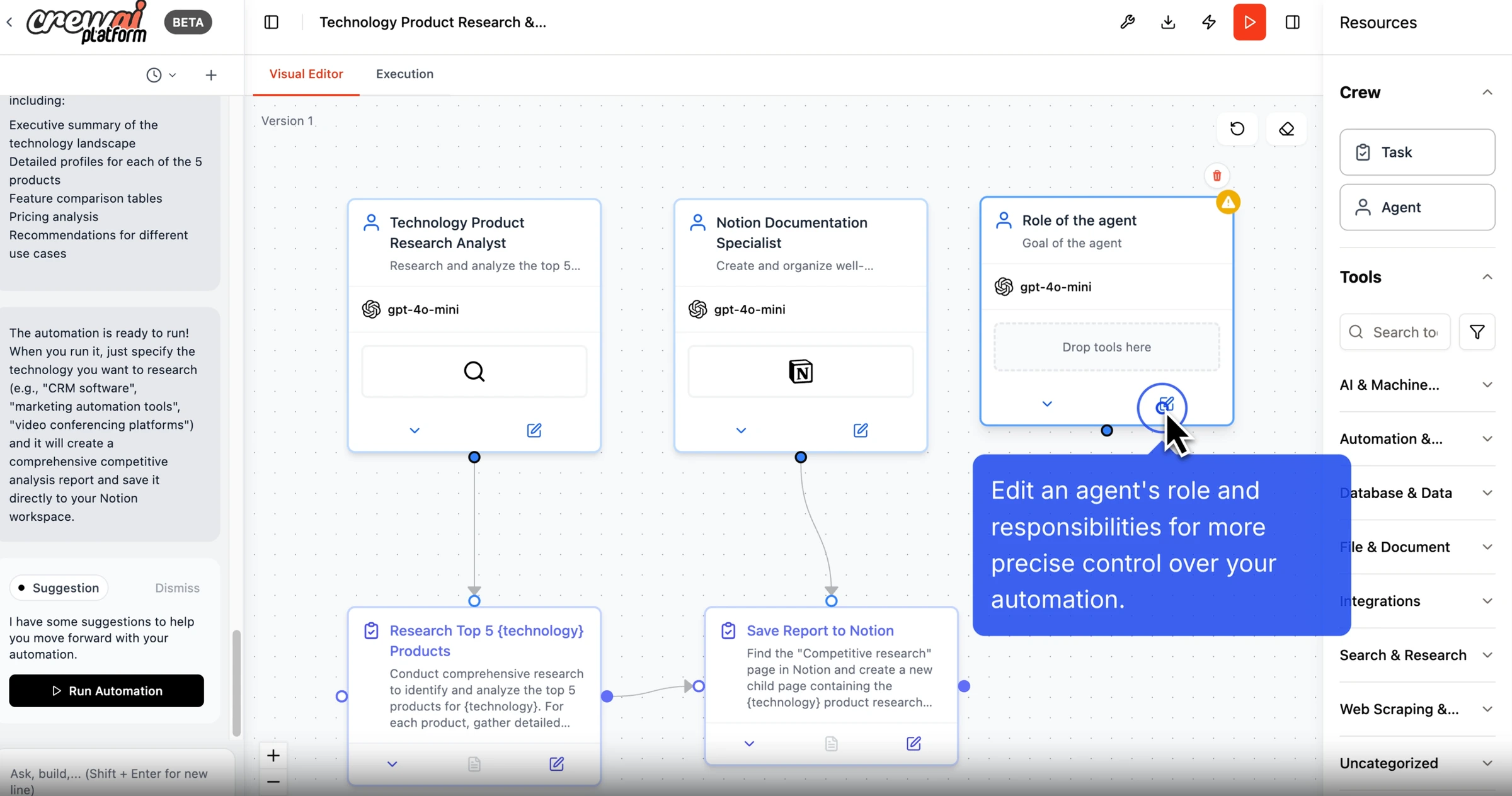
If you're a developer, CrewAI is probably the first agent framework you heard about. It's everywhere. 450 million agentic workflows monthly, 60% of Fortune 500 reportedly using it, open-source core with an active GitHub community. The pitch: build "crews" of AI agents that collaborate with defined roles, like a project manager agent delegating to a researcher agent and a writer agent. Multi-agent orchestration. Sounds incredible.
The reality, according to developers who've actually shipped with it, is more complicated. A detailed analysis on Towards Data Science found that the manager-worker architecture "doesn't effectively coordinate agents; instead, CrewAI executes tasks sequentially, leading to incorrect reasoning, unnecessary tool calls, and extremely high latency." Context overflows crash individual agents but the crew keeps running, looping for tens of minutes burning tokens. Debugging is described as "extremely difficult" since you can't unit test components independently.
That said, the free tier is legitimately good. 50 executions per month on the cloud platform with the full visual editor, AI copilot, tracing, guardrails, and human-in-the-loop features. For prototyping and experimentation, you won't find a more complete free offering. And the open-source framework (CrewAI OSS) lets you self-host with zero execution limits if you have the infrastructure.
The public pricing has simplified since launch: Basic is free with 50 workflow executions per month, while Enterprise is custom. Extra executions list at $0.50 each, which adds up fast if you're running agents hourly.
Open-source core with 50 free executions/month and full visual editor, tracing, and guardrails.
Non-technical users who need a plug-and-play agent without writing code.
- Open-source core means no vendor lock-in. Self-host on your own infrastructure with zero execution fees
- Free tier includes 50 executions/month with full features — visual editor, tracing, guardrails, human-in-the-loop
- Multi-agent 'crew' model is genuinely differentiated. Define roles, goals, and collaboration patterns between agents
- Three deployment options: cloud, self-hosted (K8s/VPC), or open-source framework. Pick what fits your stack
- Manager-worker orchestration doesn't work as documented. Tasks run sequentially, not collaboratively, in practice
- Hidden LLM calls make costs unpredictable. The framework chains requests in non-transparent ways
- Debugging is painful. Can't unit test individual agents or easily trace why a crew failed
- Requires Python knowledge and LLM understanding. This is a developer tool, not a business user tool
Worth it for developers who want maximum control and don't mind debugging. The open-source option is the best value in this entire roundup if you have the skills to use it.
Relevance AI — the "AI workforce" for teams who hate the word "agent"
The Team plan is $234/month when billed annually or $349 monthly. The lower Pro tier is $19/month on annual billing or $29 monthly. That billing distinction matters before comparing included actions, users, workforces, scheduling, calling agents, A/B testing, analytics, and support.
The concept is different from other tools here. Relevance AI positions itself as a workforce platform, not a single-agent builder. You create teams of agents that handle different business functions: one for customer support, one for lead qualification, one for data extraction. The Chat-to-Invent feature lets you describe an agent in plain language and it builds the workflow, similar to Lindy but with way more integration depth (2,000+ connectors out of the box).
The free tier exists and it's usable: 200 actions per month, unlimited agents and tools, but limited to 1 project and 30-day task history. Enough to build one agent and see if the platform clicks. The $2 one-time vendor credit bonus is a nice gesture, though it won't last long.
Where Relevance AI falls short: costs are hard to predict because both actions AND storage consume credits. Multiple G2 reviewers mention bill shock. Customer support gets mixed reviews, with delays reported on non-enterprise plans. And there's a no-prorated-refunds policy that's earned some genuinely angry feedback. One G2 review (0 out of 5 stars) simply says: "No prorated refunds. Stay away!"
2,000+ integrations out of the box, a $19/month Pro tier, and a Chat-to-Invent feature that builds agents from plain language.
Small businesses that cannot justify Team at $234/month annually or $349 monthly and need more than the smaller Pro tier.
- 2,000+ integrations out of the box. If your tool has an API, Relevance probably already connects to it
- Chat-to-Invent builds agents from natural language descriptions. Faster than manual workflow creation
- A/B testing for agent performance — unique feature that lets you optimize agent behavior over time
- Free tier with 200 actions/month is enough to evaluate the platform without financial commitment
- Team is $234/month annually or $349 monthly, a big ask for small businesses
- Both actions AND storage consume credits, making monthly costs hard to forecast
- No prorated refunds — cancel mid-cycle and you lose whatever's left. Multiple complaints about this
- Limited prebuilt agents. Most workflows require custom creation from scratch, which is time-consuming
Gumloop — the visual builder that makes agents feel less scary
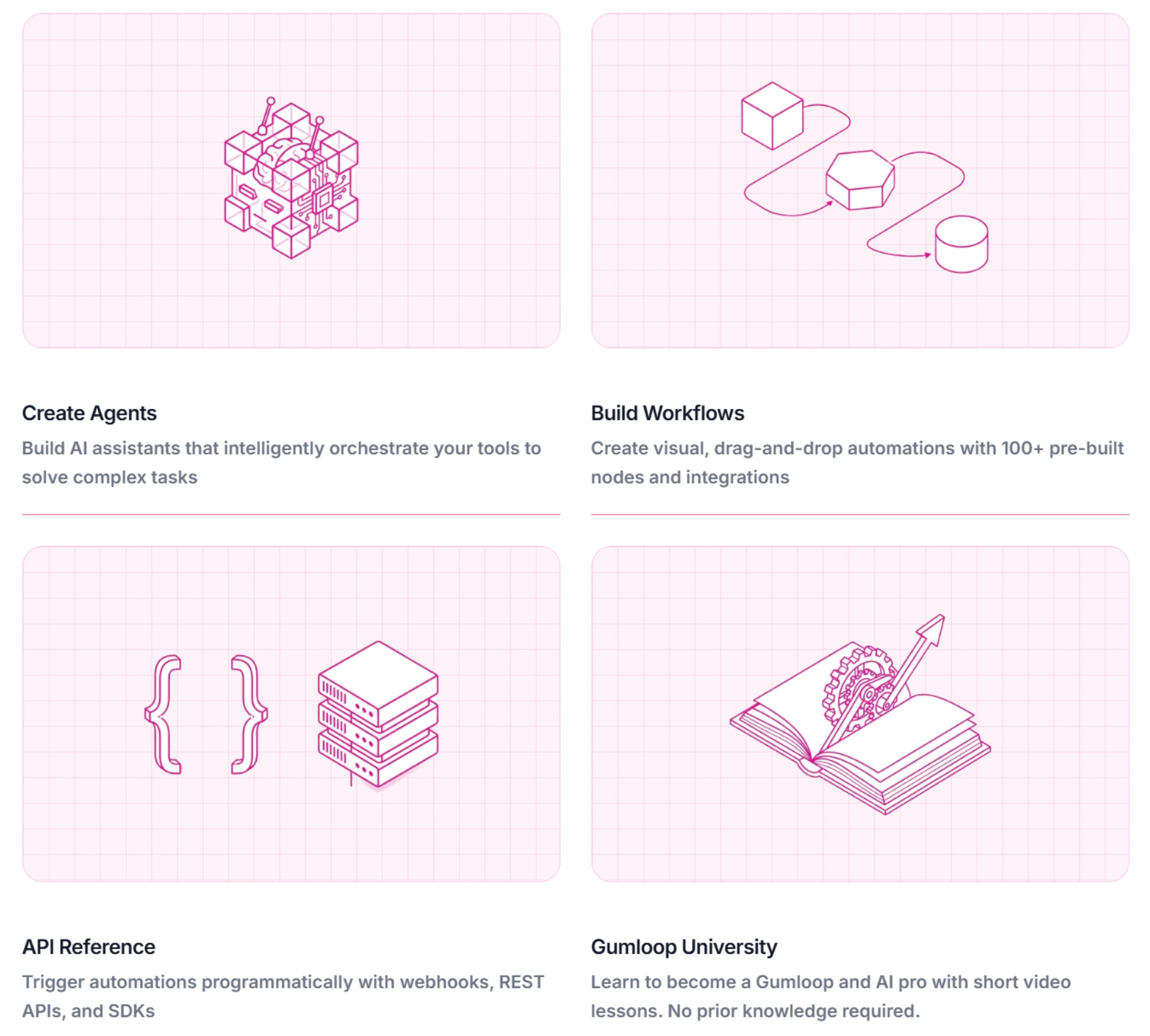
Every other tool in this roundup either requires code or hides the complexity behind natural language prompts (which means you have no idea what's happening under the hood). Gumloop takes a different approach: a visual node-based editor where you literally drag and connect action blocks to build agent workflows. Think Figma meets Make.com, but with AI nodes that can reason, summarize, and make decisions.
The free tier gives you 2,000 credits. A standard AI call costs 2 credits, but GPT-4.1 or Claude Sonnet calls cost 20 credits each. So your 2,000 credits translate to either 1,000 basic AI actions or 100 advanced ones. Not generous, but enough to build a few real workflows and decide if the platform fits.
Pro runs $37/month for 20k+ credits/month, while Enterprise is custom. Shopify, Instacart, and Webflow are listed as customers, which suggests the platform handles real production workloads. The AI assistant "Gummie" helps you create workflows by suggesting nodes and connections. Decent for beginners, though experienced users will skip straight to manual building.
The visual approach has a real advantage: you can actually see where your agent failed. When a node turns red, you know exactly which step broke. Compare that to CrewAI where debugging a failed crew requires reading through pages of logs. For teams that need agents but don't have a dedicated developer to maintain them, this visibility matters.
Node-based visual editor makes every step and failure point transparent — no black-box debugging.
Developers who want open-source flexibility or self-hosting options.
- Node-based visual editor makes agent workflows transparent. You see every step, every decision point, every failure
- Free tier with 2,000 credits — enough to build and test several real workflows before committing
- AI assistant suggests workflow structures from natural language descriptions. Lowers the learning curve
- Used by Shopify, Instacart, Webflow — production-tested at real scale, not just a demo tool
- Advanced AI calls (GPT-4.1, Claude Sonnet) cost 10x more credits than basic ones. Burns through the free tier fast
- Visual builder has a ceiling — very complex conditional logic gets messy with too many nodes and connections
- Smaller community than CrewAI or Lindy. Fewer templates, fewer tutorials, less Stack Overflow support
- No open-source option. You're locked into Gumloop's platform with no self-hosting escape hatch
Best pick for teams that want agent capabilities without the developer dependency. The visual debugging alone is worth the price of entry compared to the black-box approach of most competitors.
AgentGPT — free and open-source (with serious limits)
I'll be honest: AgentGPT is here because it's the only truly free option for people who want to experiment with AI agents without any financial commitment. Give it a goal ("research the best CRM for a 10-person sales team"), and it breaks that goal into sub-tasks, executes them, and delivers results. All in the browser, no local setup required.
The open-source codebase (reworkd/AgentGPT on GitHub) reached a stable 1.0 release with a redesigned UI. Free tier gives you 5 demo agents per day running on GPT-3.5-Turbo. The Pro plan ($40/month) unlocks GPT-4 access, 30 agents per day, 25 loops per agent, and all plugins.
But the limitations are real. GPT-3.5 on the free tier produces mediocre results for anything complex. The 25-loop cap per agent means multi-step tasks often get cut short mid-execution. Agents get stuck in loops, produce hallucinated plans, and lack the integration depth of tools like Lindy or Relevance AI. There's no CRM connector, no email integration, no calendar sync. It's a research and experimentation tool, not a production agent.
That said, for learning how AI agents work? Unbeatable. Self-host it with your own OpenAI API key and you have unlimited executions at token cost. For developers building their own agent workflows, it's a solid starting point to fork and customize.
Completely free to self-host with your own API key and zero execution limits.
Anyone who needs business tool integrations or production-ready reliability.
- Completely free to self-host with your own API key. No execution limits, no credit anxiety
- Browser-based — no local setup, no installations. Type a goal and watch it work
- Open-source codebase (1.0 stable) you can fork and customize for specific use cases
- Lowest barrier to entry for understanding how AI agents actually work under the hood
- GPT-3.5 on free tier delivers mediocre results. You need Pro ($40/mo) for GPT-4 quality
- 25-loop cap per agent means complex tasks get cut short. Not enough for real business workflows
- Zero integrations with business tools — no email, no CRM, no calendar. It's a standalone sandbox
- Agents frequently loop, hallucinate plans, or produce unusable output on ambiguous goals
Beam AI — enterprise pricing, enterprise promises
Beam's current pricing page is less opaque than it used to be. There's now a Free tier with 20 tasks/month, a Pro tier at $50/month for 200 tasks/month, a Scale plan at $3,990/month, and Custom for larger deployments.
Is it worth that? For mid-market and enterprise companies handling high-volume repetitive processes, possibly. Beam's agents are pre-trained for specific business functions: customer service, invoice processing, order management, data extraction, appointment scheduling, financial reporting. The "self-learning" angle means agents improve over time based on performance data without manual retraining.
But here's the thing. Independent reviews are almost nonexistent. The user feedback available is overwhelmingly marketing-sourced. I couldn't find substantial Reddit threads, G2 reviews, or Trustpilot entries to verify the claims. For a tool asking $12K-$48K per year, that lack of independent validation is a red flag. You're essentially trusting a sales demo until your own deployment proves the ROI.
If you're an enterprise already evaluating tools like ChatGPT Enterprise or Claude for business, Beam occupies a different niche: process-specific agents rather than general-purpose AI assistants. Whether that specialization justifies a 10-50x price premium over tools like Relevance AI depends entirely on your volume and use case.
Pre-trained, self-learning agents for specific business processes that improve without manual retraining.
Anyone without an enterprise budget or who needs independent reviews before committing.
- Pre-trained agents for specific business processes — no prompt engineering needed for common workflows
- Self-learning capability means agents improve over time without manual retraining or reprogramming
- Unlimited users and agents on all plans — no per-seat pricing games
- Fortune 500 customer base suggests real production stability, even if independent reviews are scarce
- Scale jumps to $3,990/month, so serious production usage still becomes enterprise-priced quickly
- Custom deployments are still sales-led, which usually means negotiable but also means anchoring games
- Almost zero independent user reviews. Hard to verify claims without trusting marketing material
- Heavy JavaScript rendering on the website itself — you can barely evaluate features before the sales call
Skip unless you're enterprise-scale with a specific process automation need and budget to match. Everyone else has better options above.
Side-by-side comparison
| Feature | Lindy AI | CrewAI | Relevance AI | Gumloop | AgentGPT | Beam AI |
|---|---|---|---|---|---|---|
| Starting price | $49.99/mo | Free / Custom | Free / Pro $19/mo annual ($29 monthly) | Free / $37/mo | Free / $40/mo | Free / $50/mo |
| Free tier | 7-day trial only | 50 executions/mo (full features) | 200 actions/mo, 1 project | 2,000 credits | 5 agents/day (GPT-3.5) | 20 tasks/mo |
| No-code builder | Yes (prompt-based) | Visual editor + code | Yes (Chat-to-Invent) | Yes (visual node editor) | Yes (goal-based) | Pre-built agents |
| Multi-agent support | Limited | Core feature (crews) | Yes (AI workforces) | Via chained workflows | No | Yes |
| Integrations | 100+ (Gmail, Slack, CRM, calendar) | Gmail, Slack, Salesforce, HubSpot, Notion | 2,000+ | Growing library | Web search only | Enterprise connectors |
| Self-hosted option | No | Yes (open-source + K8s) | No | No | Yes (full open-source) | No |
| Human-in-the-loop | Basic approval flows | Yes (built-in guardrails) | Yes | Manual approval nodes | No | Yes |
| Best for | Non-technical professionals | Developers, technical teams | Teams, SMBs | Visual thinkers, small teams | Learning, experimentation | Enterprise process automation |
| Action | Try Lindy | Try CrewAI | Try Relevance AI | Try Gumloop | Try AgentGPT | Contact Beam AI |
When to skip agents entirely (and use automation instead)
Hot take that no agent vendor will ever tell you: if your workflow follows predictable logic, you don't need an AI agent. You need Zapier, Make, or n8n.
"New form submission → add to CRM → send welcome email" doesn't require reasoning, context understanding, or autonomous decision-making. A $20/month Zapier plan handles that faster and more reliably than any agent on this list. And it won't hallucinate a different email template at 2 AM because the LLM had a creative moment.
AI agents make sense when the task involves: reading unstructured data (emails, documents, conversations), making judgment calls (is this lead qualified?), adapting to variable inputs (different customer questions need different responses), or chaining decisions where the next step depends on what was learned in the previous one. If that judgment is specifically outbound account selection, our AI sales prospecting tools guide is the cleaner category. If the job is customer-service deflection inside a help desk, use our AI customer support tools comparison instead. If the workflow happens over the phone instead of inside apps, our AI voice agents comparison covers Retell, Vapi, Bland, Synthflow, and ElevenLabs separately.
The r/LocalLLaMA community has been saying this for months: the real play for most people is n8n plus a local LLM. Zero privacy risk, no token costs, full control. 44% of organizations cite data privacy as the top barrier to LLM adoption. If you're worried about sending customer data through third-party agent platforms, self-hosted is the answer.
Frequently Asked Questions
Final verdict
I'll be blunt: the AI agent space in March 2026 is more hype than substance. The tools work for narrow, well-defined tasks. They fail at anything requiring genuine reasoning or multi-step complexity. If someone tells you AI agents will "replace your team," they're either selling you something or they haven't tried deploying one in production.
For non-technical users who want simple automation: Lindy AI is the easiest to set up. Just go in with realistic expectations and watch your credit consumption like a hawk. The $49.99/month can quietly double if you're not careful.
For developers who want real control: CrewAI's open-source framework is the best value play in this space. Self-host it, customize it, and you're paying only for LLM tokens. The cloud platform's free tier (50 executions/month) is also the most generous starting point.
For teams that need agents at scale: Relevance AI has the deepest integration ecosystem (2,000+) and the workforce model makes sense for businesses running multiple agent types. The price is steep, but the free tier lets you validate before committing.
For everyone else: start with a free tier. Build one agent that solves one specific problem. See if it actually saves you time or just creates a new thing to manage. The 80% failure rate isn't because the technology is bad. It's because people deploy agents for problems that don't need agents.
Ready to check Lindy AI?
Use the verified route if the trade-offs still fit. If not, jump back to the summary and compare the alternatives.
AI tools editor focused on public docs, changelogs, API limits, free-tier constraints, and developer community feedback. Turns fast-moving AI claims into buyer-focused recommendations without implying undocumented hands-on testing.
Anthony starts with the workload behind the demo, then ranks AI tools by documented model access, limits, implementation clarity, failure behavior, and the cost of an acceptable result.
Related Articles

Bardeen vs Zapier Agents vs Lindy: Best AI Coworker
AI coworkers compared by starting context, agent authority, usage economics, approval boundaries, and offboarding clarity
Compare Bardeen, Zapier Agents, and Lindy by workflow fit, approvals, credits, integrations, browser permissions, and cancellation terms.

GPT-5.6 vs Claude Sonnet 5 API: Which Tier Fits?
Production API model routing guide
GPT-5.6 Sol, Terra, and Luna compared with Claude Sonnet 5 on API price, long context, tokenization, migration risk, tools, and workload fit.